# Connecting your payout method to receive payouts
> Learn how to connect a payout method and start receiving payouts from the affiliate programs you're working with.
import { ImageCarousel } from "/snippets/components/image-carousel.jsx";
import { PayoutSupportedCountries } from "/snippets/components/payout-supported-countries.jsx";
Once you've set up a [partner profile on Dub](https://partners.dub.co/), you can connect a payout method to start receiving payouts from the programs you're working with.
Depending on your [country of residence](#supported-payout-countries), you can choose between a [stablecoin wallet](#connecting-a-stablecoin-wallet) or a [bank account](#connecting-a-bank-account) to receive payouts.
| | Stablecoin | Bank account |
| ------------------- | ------------------------------------------ | ------------------------------------------ |
| Fees | 0.5% transaction fee | No transaction fee |
| Payout currency | USDC | Local currency |
| Payout timing | Within minutes | Up to 15 business days |
| Supported countries | [Refer below](#supported-payout-countries) | [Refer below](#supported-payout-countries) |
## Connecting a stablecoin wallet
Stablecoin payouts is the easiest and fastest way to receive payouts on Dub (especially for non-US partners):
- **Get paid in USD** – instead of your local currency, you can receive payouts in USDC all around the world
- **Faster payouts** – payouts are sent within minutes instead of having to wait up to 15 business days for regular bank transfers
Stablecoin payouts are subject to a 0.5% transaction fee.
First, go to your [payout settings on Dub](https://partners.dub.co/payouts?settings=true) and select "Connect stablecoin wallet":
 This will open up the stablecoin wallet onboarding flow (`accounts.stripe.com/r/acct_xxx...`).
Then, follow the steps in the onboarding flow to connect your stablecoin wallet. You can either use the 1-click connect flow (recommended), or manually input your stablecoin wallet details.
Make sure to triple-check that you've entered the correct stablecoin wallet
address and network to receive USDC payouts. Incorrect details may result in
payout failures and lost funds.
## Connecting a bank account
Dub partners with Stripe for secure global payouts. To receive payouts directly to your bank account, you'll need to follow these steps to set up a [Stripe Express](https://support.stripe.com/express) account and connect your bank account:
First, go to your [payout settings on Dub](https://partners.dub.co/payouts?settings=true) and select "Connect bank account":
This will open up the stablecoin wallet onboarding flow (`accounts.stripe.com/r/acct_xxx...`).
Then, follow the steps in the onboarding flow to connect your stablecoin wallet. You can either use the 1-click connect flow (recommended), or manually input your stablecoin wallet details.
Make sure to triple-check that you've entered the correct stablecoin wallet
address and network to receive USDC payouts. Incorrect details may result in
payout failures and lost funds.
## Connecting a bank account
Dub partners with Stripe for secure global payouts. To receive payouts directly to your bank account, you'll need to follow these steps to set up a [Stripe Express](https://support.stripe.com/express) account and connect your bank account:
First, go to your [payout settings on Dub](https://partners.dub.co/payouts?settings=true) and select "Connect bank account":
 This will open up the Stripe Express account onboarding flow (`connect.stripe.com/setup/e/acct_xxx...`).
Then, follow the steps in the onboarding flow to create your Stripe Express account:
If you have any questions about the Stripe Express account creation flow, you
can try the following:
- Refer to the official [Stripe Express help articles](https://support.stripe.com/express)
- Reach out to [Stripe Express support](https://support.stripe.com/?contact=true)
- Reach out to [Dub support](https://dub.co/contact/support)
For the final step, you'll be asked to connect your bank account to receive payouts. You can either connect your account using Stripe's [Financial Connections](https://stripe.com/financial-connections) flow, or by manually inputting your bank account details.
**Your payout bank account must match your local currency for compliance
reasons.** E.g. if you're based in the UK, you will need to connect a GBP bank
account to receive payouts.
Related FAQ: ["Can I receive payouts in USD?"](#can-i-receive-payouts-in-usd)
## Default payout method
If you reside in a [country](#supported-payout-countries) that supports multiple payout methods, you can select a default payout method if more than one has been added.
From the payout settings panel, click the payout account dropdown and select **"Set as default"** on the payout method you want to set as your default:
This will open up the Stripe Express account onboarding flow (`connect.stripe.com/setup/e/acct_xxx...`).
Then, follow the steps in the onboarding flow to create your Stripe Express account:
If you have any questions about the Stripe Express account creation flow, you
can try the following:
- Refer to the official [Stripe Express help articles](https://support.stripe.com/express)
- Reach out to [Stripe Express support](https://support.stripe.com/?contact=true)
- Reach out to [Dub support](https://dub.co/contact/support)
For the final step, you'll be asked to connect your bank account to receive payouts. You can either connect your account using Stripe's [Financial Connections](https://stripe.com/financial-connections) flow, or by manually inputting your bank account details.
**Your payout bank account must match your local currency for compliance
reasons.** E.g. if you're based in the UK, you will need to connect a GBP bank
account to receive payouts.
Related FAQ: ["Can I receive payouts in USD?"](#can-i-receive-payouts-in-usd)
## Default payout method
If you reside in a [country](#supported-payout-countries) that supports multiple payout methods, you can select a default payout method if more than one has been added.
From the payout settings panel, click the payout account dropdown and select **"Set as default"** on the payout method you want to set as your default:
 After your default payout method is set, you'll also receive an email informing you of the change.
## Supported payout countries
Here's the full list of countries that we support sending payouts to, along with the available payout methods for each of them:
## FAQs
### My country is not supported by Dub, what should I do?
If you're not in a [supported country](#supported-payout-countries), one workaround is to create a legal entity in any of the supported countries above and use that to receive payouts instead.
For example, you can create a US LLC (using something like [Stripe Atlas](http://stripe.com/atlas)), which would let you receive payouts in USD.
Once you have an LLC ready, go to your [partner profile settings](https://partners.dub.co/settings) and update:
- **Profile Type** – Set to "Company"
- **Legal company name** – Enter your LLC's legal name
Your profile country is based on your current location and cannot be changed in the dashboard. After setting up your legal entity, [contact support](https://dub.co/contact/support) so we can update your country to match (e.g. United States).
After your default payout method is set, you'll also receive an email informing you of the change.
## Supported payout countries
Here's the full list of countries that we support sending payouts to, along with the available payout methods for each of them:
## FAQs
### My country is not supported by Dub, what should I do?
If you're not in a [supported country](#supported-payout-countries), one workaround is to create a legal entity in any of the supported countries above and use that to receive payouts instead.
For example, you can create a US LLC (using something like [Stripe Atlas](http://stripe.com/atlas)), which would let you receive payouts in USD.
Once you have an LLC ready, go to your [partner profile settings](https://partners.dub.co/settings) and update:
- **Profile Type** – Set to "Company"
- **Legal company name** – Enter your LLC's legal name
Your profile country is based on your current location and cannot be changed in the dashboard. After setting up your legal entity, [contact support](https://dub.co/contact/support) so we can update your country to match (e.g. United States).
 ### Can I receive payouts in USD?
If you're receiving payouts via [bank account](#connecting-a-bank-account), we can only send payouts in your local currency for compliance reasons. For example, if you are based in Australia, you will receive payouts in AUD.
To receive payouts in USD, we recommend switching to [stablecoin payouts](#connecting-a-stablecoin-wallet) instead, which not only lets you receive payouts in USDC, but is also a [lot faster and cheaper](#connecting-a-stablecoin-wallet).
### Can I connect a savings account instead of a checking account?
While it is possible to connect your savings account instead of a checking account, we highly recommend against it for two main reasons:
1. Some banks do not allow third-party deposits into savings accounts, which may cause your payout to fail;
2. Payouts sent to savings accounts can take significantly longer to process (up to 30 business days, depending on the bank), resulting in payout delays.
### Can I connect to my existing Stripe account instead of creating a new one?
Since we use [Stripe Express](https://support.stripe.com/express) for partner payouts, you can only connect an existing Stripe Express account to Dub (and _not an existing Stripe account_).
Here's the difference between the two:
- Stripe Express – login on `connect.stripe.com`
- Regular Stripe accounts – login on `dashboard.stripe.com`
To connect an existing Stripe Express account to Dub, make sure your partner account email matches your Stripe Express account email.
### Do I need to manually withdraw my earnings from Dub?
Unlike platforms like [PartnerStack](https://dub.co/compare/partnerstack), where you have to manually withdraw your earnings to your bank account – you do not need to manually withdraw your earnings on Dub.
Instead, your earnings/payouts are **automatically deposited into your connected bank account** the moment they are paid by the company.
### What is the minimum withdrawal amount, and how does it work?
All payouts above `$10` will be automatically deposited into your bank account as soon as the program processes its payment.
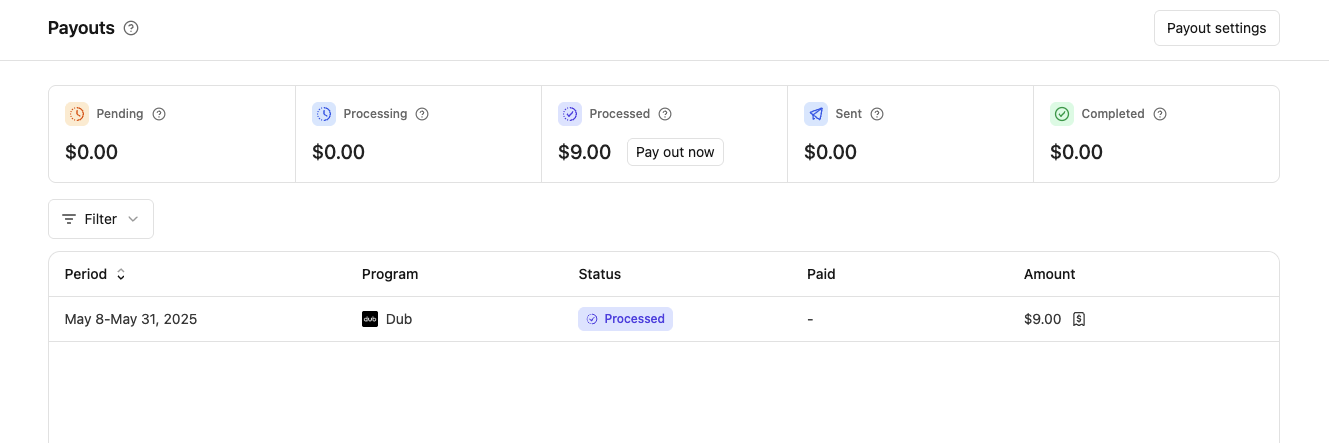
If your payouts are below `$10`, you can still withdraw them for a `$0.50` fee. Go to your [Payouts page](https://partners.dub.co/payouts) and click on "Pay out now" in the "Processed" box to withdraw your payout.
### Can I receive payouts in USD?
If you're receiving payouts via [bank account](#connecting-a-bank-account), we can only send payouts in your local currency for compliance reasons. For example, if you are based in Australia, you will receive payouts in AUD.
To receive payouts in USD, we recommend switching to [stablecoin payouts](#connecting-a-stablecoin-wallet) instead, which not only lets you receive payouts in USDC, but is also a [lot faster and cheaper](#connecting-a-stablecoin-wallet).
### Can I connect a savings account instead of a checking account?
While it is possible to connect your savings account instead of a checking account, we highly recommend against it for two main reasons:
1. Some banks do not allow third-party deposits into savings accounts, which may cause your payout to fail;
2. Payouts sent to savings accounts can take significantly longer to process (up to 30 business days, depending on the bank), resulting in payout delays.
### Can I connect to my existing Stripe account instead of creating a new one?
Since we use [Stripe Express](https://support.stripe.com/express) for partner payouts, you can only connect an existing Stripe Express account to Dub (and _not an existing Stripe account_).
Here's the difference between the two:
- Stripe Express – login on `connect.stripe.com`
- Regular Stripe accounts – login on `dashboard.stripe.com`
To connect an existing Stripe Express account to Dub, make sure your partner account email matches your Stripe Express account email.
### Do I need to manually withdraw my earnings from Dub?
Unlike platforms like [PartnerStack](https://dub.co/compare/partnerstack), where you have to manually withdraw your earnings to your bank account – you do not need to manually withdraw your earnings on Dub.
Instead, your earnings/payouts are **automatically deposited into your connected bank account** the moment they are paid by the company.
### What is the minimum withdrawal amount, and how does it work?
All payouts above `$10` will be automatically deposited into your bank account as soon as the program processes its payment.
If your payouts are below `$10`, you can still withdraw them for a `$0.50` fee. Go to your [Payouts page](https://partners.dub.co/payouts) and click on "Pay out now" in the "Processed" box to withdraw your payout.